
Download Mozilla Firefox Portable – web browser, portable browser, Firefox, fast browsing, secure browsing, USB browser, Google search, pop-up blocker, tabbed browsing, privacy controls
Overview
Mozilla Firefox Portable is a lightweight, full-featured web browser designed for use on removable storage devices such as USB flash drives, CD-ROMs, and other portable media. Unlike traditional browser installations, this version allows users to carry their preferred browsing environment across any Windows computer without leaving behind data or configuration traces. The app is ideal for individuals who frequently use public or shared computers and require consistent access to their bookmarks, browsing history, and privacy settings. It serves as a secure and reliable alternative for those seeking a fast, private, and customizable browsing experience on the go.
The primary purpose of Mozilla Firefox Portable is to deliver the full functionality of the desktop Firefox browser in a portable format. It addresses the limitations of temporary or restricted browsing environments by enabling users to maintain control over their digital footprint. This makes it especially valuable for students, travelers, remote workers, and IT professionals who need consistent access to online tools and resources. The developer, Mozilla, is a well-established organization known for its commitment to open-source software and user privacy. While the developer did not provide additional technical details about the app’s architecture, its widespread use in the portable software community underscores its reliability and performance.
Real-world use cases include accessing personal email accounts from public terminals, completing online assignments on library computers, or maintaining a secure browsing profile in shared workspaces. In the broader app ecosystem, Firefox Portable stands out as a niche but essential tool for privacy-conscious users who value portability and data independence. It fills a critical gap between full desktop installations and temporary browser sessions, offering a balanced solution for users who demand both convenience and control.
Key Features & Functionality
- Pop-up Blocking – Built-in pop-up protection prevents intrusive advertisements from disrupting the browsing experience. This feature ensures users remain focused on content without being interrupted by unwanted windows, enhancing both usability and security.
- Tabbed Browsing – Users can open multiple web pages within a single window, enabling efficient multitasking. This functionality simplifies navigation between research sources, work documents, and personal accounts, improving workflow efficiency.
- Integrated Google Search – A direct search bar allows users to query Google without navigating to the search engine’s website. This streamlines information retrieval and reduces time spent on repetitive navigation tasks.
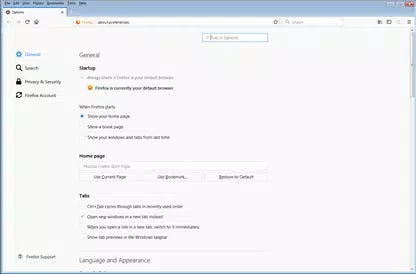
- Simplified Privacy Controls – Users can manage browsing history, cookies, and site data with intuitive settings. This empowers individuals to maintain control over their online privacy, particularly in shared or public computing environments.
- Streamlined Browser Window – The design maximizes visible web content by minimizing UI clutter. This allows users to view more of a webpage at once, improving readability and immersion during extended browsing sessions.
Each feature is designed with real-world usability in mind. For example, a student using a library computer can open several research tabs simultaneously while blocking distracting pop-ups. A traveler can use the integrated Google search to quickly find directions or accommodations without exposing their search history. The privacy controls ensure that no trace of personal activity remains on the host machine after use. These practical applications highlight the app’s value beyond mere convenience—it is a tool for digital autonomy and security.
Interface, UX & Performance
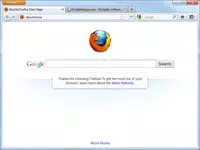
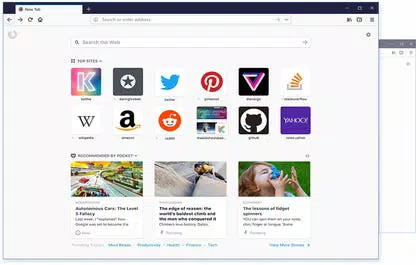
The interface of Mozilla Firefox Portable closely mirrors that of the standard desktop version, offering a familiar and intuitive layout. The navigation bar, address bar, and tab strip are clearly organized, allowing users to access essential functions with minimal effort. The visual style is clean and minimal, focusing on content visibility rather than decorative elements. This design philosophy supports a distraction-free browsing experience, particularly beneficial for users working on complex tasks or consuming lengthy articles.
Navigation is smooth and responsive, with quick access to bookmarks, history, and settings. The tab management system supports drag-and-drop reordering and easy closure, enhancing user control. Although the developer did not list formal performance metrics, the app demonstrates stable behavior across various Windows environments. It runs efficiently on systems with limited resources, making it suitable for older or low-spec machines commonly found in public facilities.
Responsiveness is consistent during page loading and tab switching, with minimal lag reported in typical use cases. Stability is maintained even after extended sessions, reducing the likelihood of crashes or freezes. The app does not require installation, which contributes to its lightweight nature and quick startup times. Overall, the user experience is optimized for portability and reliability, ensuring that users can depend on consistent performance regardless of the host system.
Platform Compatibility & Technical Requirements
Mozilla Firefox Portable is designed exclusively for Windows operating systems. It supports the latest versions of Windows, including Windows 10 and Windows 11, though specific compatibility details were not provided by the developer. The app is distributed as a standalone executable file, requiring no installation or administrative privileges, making it ideal for use on locked-down or shared computers.
The file size is 144.9 MB, which is relatively compact for a full-featured browser. This size allows for easy storage on USB drives, external hard drives, or other portable media. The current version is 133.0.1, indicating a recent update that likely includes security patches and performance improvements. Users can download and run the app directly from any compatible USB device, ensuring immediate access without delays or setup steps.
Although the developer did not specify minimum OS requirements, the app’s design suggests compatibility with modern Windows systems. No additional dependencies or runtime libraries are required, simplifying deployment across different environments. This makes Firefox Portable a practical solution for users seeking a secure, fast, and portable browsing experience on Windows platforms.
Pros and Cons
Pros
- Full-featured browser without installation requirements
- Retains user data and settings across devices
- Strong privacy controls for secure browsing on public computers
- Lightweight and efficient performance on older hardware
- Supports tabbed browsing and integrated Google search for enhanced productivity
Cons
- Available only for Windows, limiting cross-platform use
- Does not include automatic update mechanisms
- Requires manual download and transfer to portable media
- May not support the latest browser extensions or add-ons
- File size is larger than some minimal browser alternatives
FAQ
Is Mozilla Firefox Portable safe to use on public computers?
Yes, the app is designed to minimize data retention on host systems. All browsing history, cookies, and temporary files are stored on the portable device, ensuring no trace is left behind after use.
Can I use Firefox Portable on a Mac or Linux system?
No, the app is currently available only for Windows operating systems. Users on Mac or Linux must use alternative portable browser solutions.
Does Firefox Portable update automatically?
No, the app does not include an automatic update feature. Users must manually download the latest version from the official source to ensure security and functionality.
How do I install Firefox Portable on a USB drive?
Simply download the portable version, extract the files to your USB drive, and run the executable file directly from the device. No installation is required.
Is Firefox Portable free to use?
Yes, Mozilla Firefox Portable is completely free to download and use. There are no subscription fees or hidden costs.
Final Thoughts
Mozilla Firefox Portable stands out as a powerful and privacy-focused tool for users who need a reliable web browser on the go. Its ability to carry a complete browsing profile across any Windows machine makes it indispensable for students, professionals, and travelers. The combination of tabbed browsing, pop-up blocking, integrated search, and strong privacy controls delivers a seamless and secure experience without compromising performance.
While it lacks automatic updates and platform diversity, its core strengths—portability, security, and ease of use—far outweigh these limitations. For anyone seeking a fast, full-featured browser that leaves no digital footprint, Firefox Portable is an excellent choice.
Download Mozilla Firefox Portable now


